Envoy Connect et Connexion CAÉB
À propos du lecteur Envoy Connect
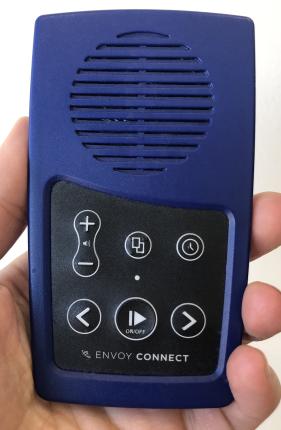
Le lecteur Envoy Connect est un lecteur de livres audio portatif, abordable et facile à utiliser. Ce petit appareil à la présentation simple et intuitive offre à ses utilisateurs une nouvelle option pour accéder aux livres du CAÉB. Il peut être envoyé par la poste au CAÉB pour le faire recharger de nouveaux titres. L’utilisateur peut également choisir de télécharger directement des livres ou des magazines à partir de son étagère de Téléchargement direct du CAÉB , ou encore de faire appel à notre nouveau logiciel, appelé Connexion CAÉB. Ce logiciel simple d’utilisation ne requiert aucune compétence avancée en informatique, et permet aux utilisateurs d’obtenir rapidement et facilement de nouveaux livres, sans avoir à attendre de livraison postale. Les utilisateurs peuvent donc choisir l’envoi postal, la recharge chez soi à l’aide de Connexion CAÉB ou les deux, selon leurs besoins.
Pour l’instant, seul l’appareil Envoy Connect 2 est offert à l’achat d’INCA Mieux Vivre. La seule différence entre l’appareil Envoy Connect d’origine et l’appareil Envoy Connect 2 réside dans le port de chargement : l’Envoy Connect 2 est doté d’un port USB-C, tandis que l’Envoy Connect d’origine est doté d’un port micro-USB.
Guides, tutoriels et démos d’utilisation du lecteur Envoy Connect
Les guides, tutoriels et démos concernent l’appareil Envoy Connect d’origine, ainsi que l’appareil Envoy Connect 2. La seule différence entre ceux-ci réside dans le port de chargement : l’Envoy Connect 2 est doté d’un port USB-C, tandis que l’Envoy Connect d’origine est doté d’un port micro-USB. Cette différence sera indiquée chaque fois qu’elle s’applique.
Guide de l’utilisateur
Ce guide complet sur l’utilisation du lecteur Envoy Connect, disponible en plusieurs formats, contient tout ce que vous devez savoir sur cet appareil.
Guide de référence rapide
Cette version beaucoup plus condensée du Guide de l’utilisateur Envoy Connect, disponible en plusieurs formats, fournit simplement l’information nécessaire pour vous initier à votre lecteur.
Guide audio de démarrage rapide
Cette courte présentation audio vous initiera à l’utilisation du lecteur Envoy Connect.
Démo audio
Cette démonstration audio détaillée vous fera découvrir toutes les fonctions du lecteur Envoy Connect et vous en expliquera l’utilisation en détail.
À propos du logiciel Connexion CAÉB
Connexion CAÉB est un logiciel qui vous permet de télécharger sur votre lecteur Envoy Connect ou sur votre ordinateur des titres figurant dans votre étagère de Téléchargement direct du CAÉB. Ce logiciel peut également servir à effacer des titres de votre lecteur, de votre étagère de Téléchargement direct ou de votre ordinateur.
Pour utiliser Connexion CAÉB, vous devez être abonné au CAÉB et disposer d’un numéro de compte et d’un mot de passe. Si vous n’êtes pas abonné au CAÉB, composez le 1-855-655-2273 ou écrivez-nous à l’adresse aide@bibliocaeb.ca.
Connexion CAÉB a été conçu pour les ordinateurs fonctionnant sous Windows ou une version plus récente. Ce logiciel ne fonctionne pas avec les ordinateurs Mac et nécessite une connexion à Internet.

Installation de Connexion CAÉB
Une fois le logiciel téléchargé, naviguez jusqu’à l’endroit où il se trouve sur votre ordinateur. Ouvrez le fichier « CELAConnectInstaller.exe » pour lancer l’installation.
Vous recevrez peut-être une alerte de sécurité de Microsoft Windows vous demandant si vous souhaitez procéder à l’installation. Le logiciel Connexion CAÉB a fait l’objet de nombreux test et son installation est sans risque. Sélectionnez le bouton « Installer » pour procéder. Un raccourci (icône) Connexion CAÉB apparaîtra sur votre bureau une fois l’installation terminée.
Reportez-vous au Guide de référence rapide, dont le lien figure ci-dessous, pour avoir un aperçu de l’utilisation de Connexion CAÉB. Pour obtenir des instructions plus détaillées, vous pouvez consulter le Guide de l’utilisateur de Connexion CAÉB, dont le lien est également fourni ci-dessous.
Guides, tutoriels et démos d’utilisation du logiciel Connexion CAÉB
Guide de l’utilisateur
Ce guide détaillé sur Connexion CAÉB, disponible en plusieurs formats, contient toute l’information nécessaire pour utiliser ce logiciel.
Guide de référence rapide
Cette version beaucoup plus condensée du Guide de l’utilisateur, disponible en plusieurs formats, fournit simplement l’information nécessaire pour vous initier au logiciel Connexion CAÉB.
Guide audio JAWS
Ce tutoriel audio vous propose de l’information sur l’utilisation de Connexion CAÉB à l’aide du lecteur d’écran JAWS, notamment comment ouvrir une session, effacer des livres de votre lecteur ou encore en ajouter.
Tutoriel vidéo
Ce tutoriel en format vidéo vous donnera un aperçu du logiciel Connexion CAÉB. Vous y apprendrez comment ouvrir une session, effacer des livres de votre lecteur ou encore en ajouter.
FAQ sur Envoy Connect et Connexion CAÉB
Vous trouverez sur notre page de FAQ et de dépannage sur Envoy Connect et Connexion CAÉB des solutions aux problèmes les plus fréquents.